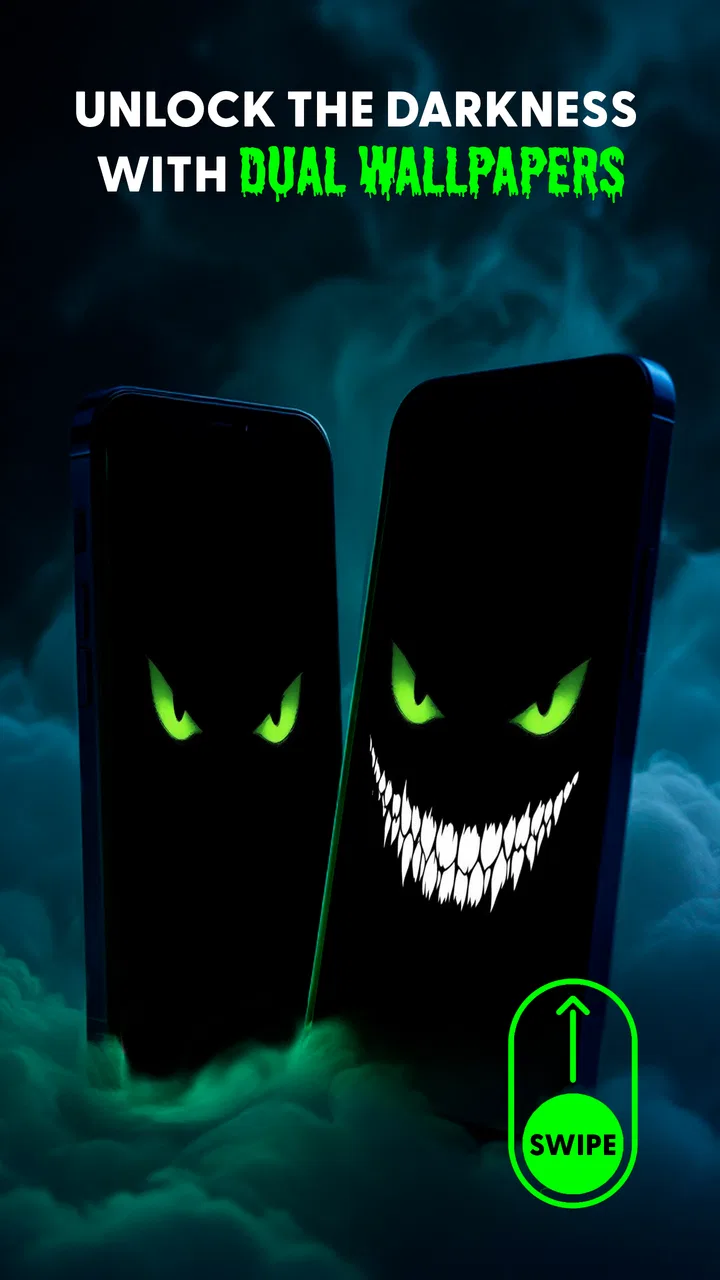
Evil Eyes Live Wallpapers
- 4.7
- Rating
- 1.00M
- Installs
- Free
- Price

 Analysis by App-foxy
I installed Evil Eyes Live Wallpapers expecting a simple visual novelty, and that is exactly where it makes the strongest impression: it turns an otherwise ordinary Android screen into a small piece of eerie decoration. The idea is direct rather than complicated. Animated eyes appear to blink in the dark, giving your wallpaper a creepy, watchful character whenever you look at the display.
That narrow focus is important when deciding whether to use it. This is not a full personalization suite, a launcher replacement, or a wallpaper library designed to suit every mood. It is a free personalization app from DummTech built around one memorable horror effect. If you enjoy unsettling visuals, Halloween-style themes, or wallpapers that make your phone feel less predictable, I can see the appeal immediately. If you prefer calm landscapes, clean gradients, battery-conscious static images, or extensive design controls, the usual alternatives may suit you better.
What I considered before keeping it on my phone
My first decision criterion was whether the animation actually adds atmosphere instead of becoming an annoyance. A live wallpaper has to work both when I notice it and when I do not. The blinking eyes are effective because the concept is instantly readable: I do not need to study the screen to understand the theme. At the same time, the effect is deliberately attention-seeking, so I would not recommend it blindly for a work phone or a device that needs to feel neutral in every setting.
You May Also Like

 Blood Strike: 2.5 Anniversary
Blood Strike’s Loadouts Turn Every Drop Into a Tactical Gamble
A close look at Blood Strike’s custom loadouts: how fast access to signature weapons reshapes its battle royale rhythm, rewards preparation, and narrows the gap between fights.

 Pandora - Music & Podcasts
Pandora’s Music Is Easy to Start, but Harder to Recover
Pandora’s strength is its low-effort path from a seed to a station. Its weak spot is how much confidence it asks you to place in connection, setup, and quiet recovery.

 8 Ball Pool
 Is Built on Rivalries, Rematches, and Routine
A close look at the rivalries, rematches, shared routines, and unanswered safety questions that turn a quick pool match into a persistent mobile community.

 Samsung Music
’s Quiet Strength Is Playing What You Already Own
Its reach comes less from spectacle than from dependable access to a personal library. That simplicity is both the app’s strongest retention engine and its ceiling.

 AccuWeather: Weather Radar
AccuWeather Review: A Quick, Clear Forecast for Everyday Decisions
For everyday plans, the best forecast is the one you can understand quickly. AccuWeather makes rain timing, radar, and local conditions easy to act on, with a few trade-offs.

 Hill Climb Racing
Why Hill Climb Racing Still Turns Crashes Into One More Run
A tiny car, a bumpy hill and one more upgrade: Hill Climb Racing keeps resurfacing because its simple chaos makes every near-miss feel personal.
More From Our News Desk



The second criterion was how well the theme matches the rest of the phone. A spooky wallpaper can look fun alongside dark icons, black widgets, or a horror-inspired lock screen. It can look oddly out of place beside bright productivity widgets and colorful shortcuts. I found that the app works best when treated as the visual centerpiece rather than one decoration among many. The eyes already provide a strong focal point, so adding several competing widgets can make the home screen feel crowded.
I also considered the practical questions most people ask before changing a wallpaper. The app is free, and its content rating is Everyone, which makes it easy to try without committing money or choosing a mature-rated experience. It supports Android 7.0 and later, so users with older compatible phones can consider it as well. The current version is 5.31.9, and the app has passed the one-million-install mark, while its average rating is 4.7 from roughly sixty thousand ratings. Those figures suggest that the concept has found a substantial audience, although personal taste matters more here than popularity.
One detail I would not overlook is that a live wallpaper is experienced repeatedly, not just during the first minute after installation. The initial surprise may be entertaining, but the real test is whether the blinking still feels pleasant after several days. I recommend living with it through different situations: checking the time in the morning, unlocking the phone in a bright room, and glancing at it at night. That tells you more than a quick preview because an effect that feels atmospheric in the dark may feel excessive in daylight.
The visual idea is simple, and that is its advantage
The central image does not ask me to learn a control system or understand a complicated theme. The eyes blink, the screen feels watched, and the mood is established quickly. This simplicity makes the app approachable for someone who wants a dramatic change without rebuilding the entire phone interface.
It also makes the app more specific than a broad wallpaper catalog. With a large catalog, I often spend more time browsing than choosing. Here, the identity is clear from the start. That can be a strength for a user who already knows they want creepy eyes, but it is also the main limitation for anyone who wants several styles in one installation.
In everyday use, I would place it on a secondary device, a personal phone, or a phone used for entertainment rather than formal communication. Imagine checking your phone during a movie night with friends: the subtle movement can become part of the atmosphere without requiring a separate prop. On a business phone during a meeting, the same effect could make the device feel less professional if the screen lights up unexpectedly. That contrast is a useful way to judge it before making the switch.
Where this wallpaper wins over ordinary choices
The biggest win is personality. A static photograph can be attractive, but it usually remains passive. This wallpaper gives the screen a small sense of movement and presence. The blinking creates a visual response when I return to the phone, which makes the device feel more like a themed object than a plain tool.
It also wins when the goal is a quick transformation. I do not need to coordinate a complete icon pack, search for matching widgets, or spend an evening arranging every element. Choosing a creepy animated background can change the mood of the phone in one decision. For someone decorating a device for a seasonal event or simply wanting a conversation starter, that immediacy is more valuable than a long list of customization controls.
Another strength is that the theme has a clear emotional direction. Many personalization apps offer attractive images but leave the user to decide what atmosphere they create. Evil Eyes Live Wallpapers does that work for me. The dark, unsettling concept is already defined, so the result feels intentional even if the rest of my home screen remains unchanged.
I also think it is a good fit for people who use their lock screen and home screen as part of their personal style. A phone is something I pick up many times each day, and a distinctive background can make those repeated interactions less dull. The effect is especially suitable for horror fans, people preparing a spooky party, or anyone who wants a playful scare rather than a conventional scenic image.
Small choices that make the result feel better
My first practical tip is to simplify the surrounding layout before judging the wallpaper. Remove or move widgets that cover the central visual area, then check whether the eyes remain readable behind your icons. If the screen looks busy, the problem may not be the animation itself; it may be the combination of too many foreground elements with an already dramatic background.
My second tip is to test it with both light and dark interface settings if your phone offers that choice. A dark theme will usually support the horror mood more naturally, while a bright interface can create a deliberate contrast. I prefer the darker presentation because it lets the animated eyes carry the attention instead of making the screen look like several unrelated styles placed together.
A third useful approach is to reserve it for a particular period instead of treating it as a permanent wallpaper. I might use it for a weekend gathering, a seasonal change, or a short experiment, then return to a calmer background when I need a more restrained phone. That is not a weakness; it is a realistic way to enjoy a strongly themed design without becoming tired of it.
I would also preview the phone from a distance. Some wallpapers look good when examined closely but lose their shape when viewed across a room. This one depends on the eyes being recognizable, so the effect is strongest when the main image remains visible behind the app icons. A clean arrangement helps more than adding extra decorative layers.
Where broader personalization apps may fit better
The usual alternative is a static wallpaper app or the image picker already built into the phone. Those options are better when I want a peaceful photograph, a simple color, or a background that never changes. They are also easier to forget once installed: a static image does not draw attention every time the screen appears.
A broad live-wallpaper catalog may be a better choice for someone who changes themes often. That kind of app can offer nature scenes, abstract motion, space imagery, seasonal designs, and other moods in one place. I would choose that route if I wanted variety more than a single horror identity. The trade-off is that browsing a large collection can make the decision slower, while this app reaches its intended look immediately.
System personalization tools may also be preferable for users who care about a perfectly coordinated interface. A phone’s built-in options are usually designed to match colors, icons, widgets, and lock-screen elements together. Evil Eyes Live Wallpapers is more like a strong accent. It can fit into a broader setup, but it does not replace the need to think about readability and visual balance.
For a child’s device, the Everyone rating makes the app broadly accessible, but I would still make the choice based on the child’s sensitivity to creepy imagery. An age label cannot tell me whether a particular child will enjoy or dislike a pair of blinking eyes in a dark scene. For a family phone shared by several people, a neutral wallpaper is probably the safer compromise.
People who are sensitive to motion should be more cautious as well. The defining feature is animation, so anyone who finds moving backgrounds distracting may prefer a static image. Likewise, users who want the least visually active screen possible should not choose this simply because it is free. The price removes a financial barrier, but it does not remove the stylistic trade-off.
What changing to it involves in daily use
Switching from a normal image to a live wallpaper is easy conceptually, but I still recommend checking the result immediately after applying it. Look at the home screen, the lock screen if you use it there, and any screen where icons sit over the image. The important question is not just whether the animation looks attractive in isolation; it is whether text and shortcuts remain easy to find.
If you later decide to leave, the cost of switching is mostly visual rather than financial. Because the app is free, trying it does not require a purchase decision, and returning to another background is a straightforward change of personalization. The real cost is the time spent arranging a screen around the eyes. If you move widgets or icons to make the composition work, remember their original positions before experimenting so that reverting does not become frustrating.
I would not install it expecting a complete phone makeover. It changes the background experience, not the underlying organization of the device. Your launcher behavior, icons, widgets, and everyday apps remain what they were. That is useful if I want a low-commitment experiment, but disappointing if I am looking for a full theme with a coordinated interface.
The app’s broad adoption and strong average rating make it feel like a reasonable trial for the right audience, but neither popularity nor a high rating guarantees that the visual style will suit everyone. A person who loves the concept may keep it for months; another person may remove it after a single evening because the movement is too noticeable. Both reactions are understandable because the app has a very focused personality.
Who should install it, and who should skip it
I would recommend it to someone who wants a creepy animated screen without paying for a personalization experiment. It is particularly suitable for a personal Android phone, a horror-themed setup, a seasonal decoration, or a user who enjoys visual effects with an immediate payoff. The clear concept means you can decide quickly whether it matches your taste.
I would suggest skipping it if your priority is maximum calm, maximum flexibility, or a polished professional appearance. A static wallpaper is the better choice for a distraction-free screen. A larger live-wallpaper collection is better for variety. Built-in phone personalization is better when coordinated colors and system-level consistency matter more than a striking central image.
I would also skip it if you are choosing one wallpaper for a device used by several people with very different preferences. The eyes are not a neutral compromise. They communicate a specific mood, and that is precisely why they work for the right person.
My recommendation after using it
Evil Eyes Live Wallpapers is worth trying when you want one strong idea rather than an endless menu of designs. I like its directness: it gives the phone an eerie character quickly, costs nothing to test, and avoids the clutter of a full customization project. The animated eyes are memorable, and the app’s focus makes it easier to know whether you will enjoy the result.
My recommendation comes with a clear condition: treat it as a mood wallpaper, not an all-purpose personalization solution. Keep the surrounding layout simple, check readability, and decide whether the movement still feels comfortable after the novelty fades. If you want a screen that feels watched, strange, and a little playful, this is a convincing choice. If you want a background that stays quiet and invisible, choose a static alternative instead.
For me, the app succeeds because it understands its own purpose. It does not need to imitate a complete theme system. It only needs to make the screen feel different when I pick up the phone, and the blinking eyes accomplish that with very little effort. That makes it an easy recommendation for horror fans and a poor recommendation for anyone seeking neutrality—but a useful decision guide should make that distinction clear.
FAQs for Evil Eyes Live Wallpapers
01What features does the Evil Eyes Live Wallpapers app offer?
Evil Eyes Live Wallpapers provides users with a collection of mesmerizing and dynamic wallpapers featuring the iconic evil eye symbol. The app includes a variety of customization options, such as adjusting animation speeds, selecting different color themes, and setting wallpapers to change automatically. This ensures a personalized and visually captivating experience for your device.
02Is the Evil Eyes Live Wallpapers app compatible with all devices?
The app is designed to work seamlessly on most Android and iOS devices. However, compatibility might vary depending on the device's operating system version. It's recommended to check the app's requirements in the app store to ensure it will function properly on your specific device before downloading.
03Does the app consume a lot of battery or system resources?
Evil Eyes Live Wallpapers is optimized to minimize battery usage and system resource consumption. While live wallpapers can use more power than static images, this app includes features to adjust animation settings, helping to reduce battery drain. Users can modify these settings for a balance between visual appeal and battery efficiency.
04Are there any in-app purchases or ads in the Evil Eyes Live Wallpapers app?
The app may include both in-app purchases and ads. While the basic version provides several free wallpapers, additional premium content might be available through purchases. Advertisements help support the free version, but users can opt for an ad-free experience by upgrading through in-app purchases.
05How often are new wallpapers added to the Evil Eyes Live Wallpapers app?
The app frequently updates its library with new wallpapers to keep the content fresh and engaging. Updates are typically based on user feedback and trends, ensuring a diverse selection. Checking the app regularly or enabling notifications will keep you informed about the latest additions and enhancements.
Pros
- Stunning high-resolution graphics
- Easy to navigate and customize
- Minimal battery consumption
- Regular updates with new designs
- Free to download with optional premium features
Cons
- Ad-supported with frequent pop-ups
- Limited free design options
- Requires Android 5.0 or higher
- Occasional lags on older devices
- In-app purchases can be pricey

Evil Eyes Live Wallpapers
Gallery